
Building Intelligent Event-Driven Applications with Azure Messaging and Azure AI Foundry
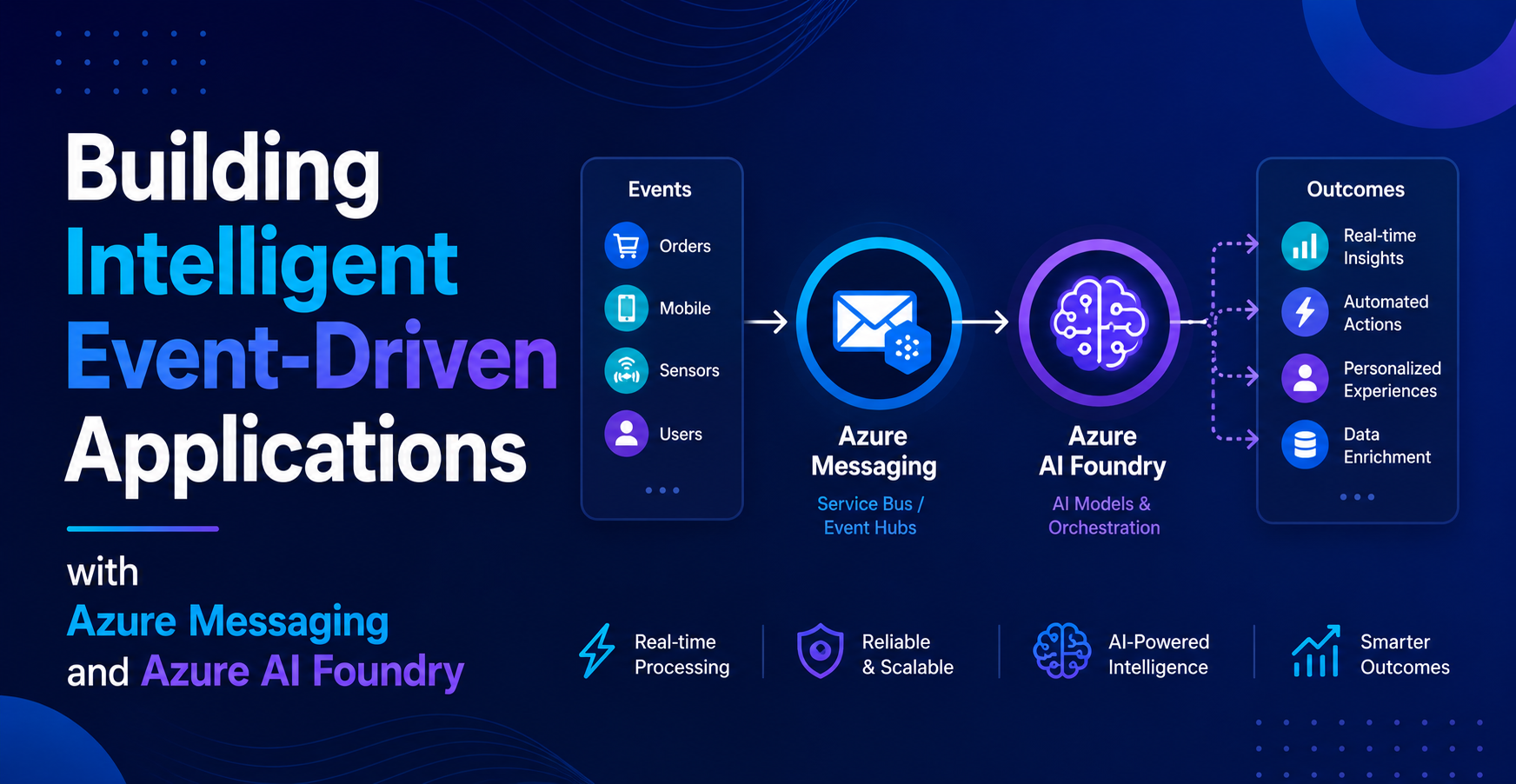
Modern applications are no longer just about handling requests and returning responses.
They react. They process. They learn.
If you combine event-driven architecture with AI, you unlock a completely different kind of system. One that doesn’t just respond, but actually understands and adapts.
In this blog, I’ll walk through how you can combine Azure Messaging services with Azure AI Foundry to build intelligent, event-driven applications.
Why Combine Messaging and AI?
Event-driven systems are great at reacting to changes.
AI systems are great at interpreting data.
Put them together, and you get systems that:
- React in real-time
- Make decisions automatically
- Process large volumes of data intelligently
Instead of just triggering workflows, you’re now triggering intelligent workflows.
The Core Idea
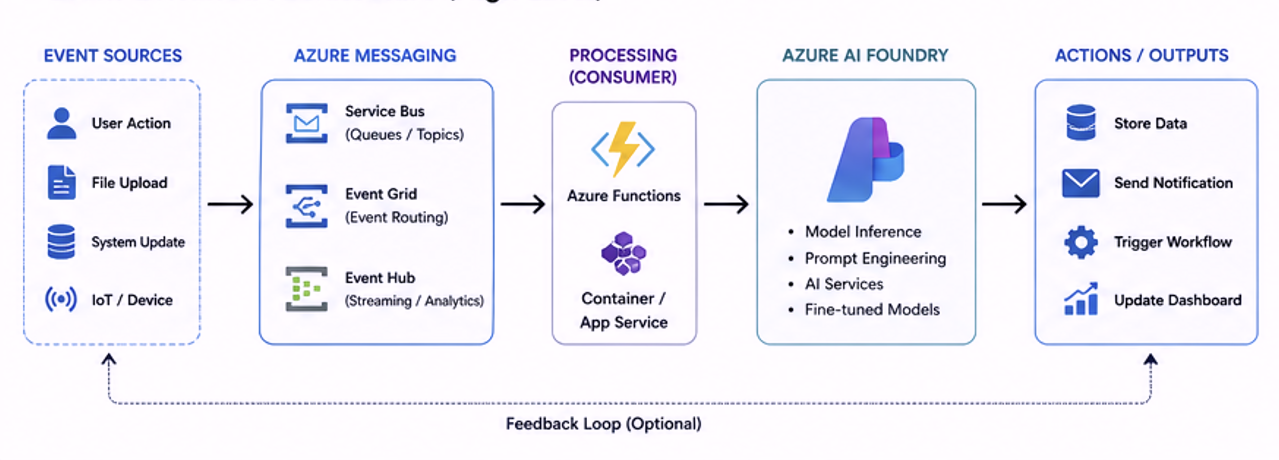
Here’s the high-level flow:
- An event happens (user action, system update, file upload, etc.)
- The event is sent through a messaging service
- A consumer picks it up
- The event is processed using AI
- The result triggers another action
That’s your intelligent pipeline.
Azure Messaging Services in the Mix
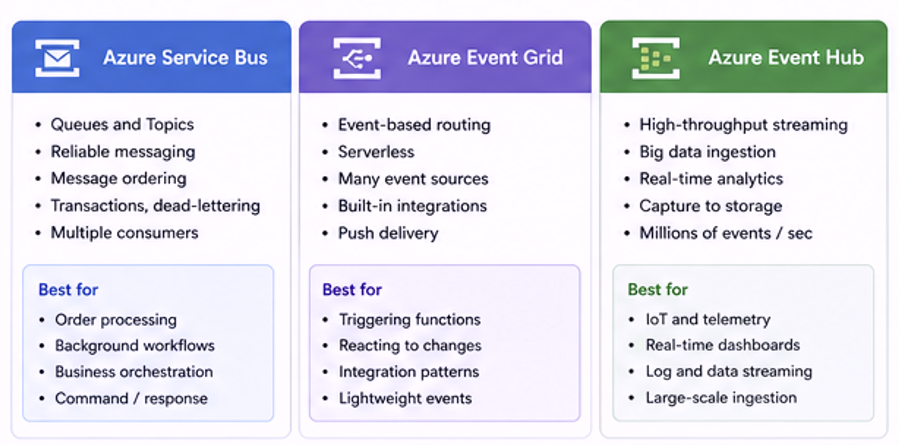
Depending on your use case, you’ll use different services.
Azure Service Bus
Use this when:
- You need reliable message delivery
- You need queues or topics
- You want multiple consumers
Perfect for:
- Order processing
- Background workflows
- Business logic orchestration
Azure Event Grid
Use this when:
- You want event-based notifications
- You’re integrating multiple services
- You want serverless event routing
Perfect for:
- Triggering functions
- Reacting to resource changes
- Lightweight event flows
Azure Event Hub
Use this when:
- You have high-volume data
- You need streaming or analytics
- You’re dealing with telemetry or logs
Perfect for:
- IoT data
- Real-time dashboards
- Large-scale ingestion
Where Azure AI Foundry Comes In
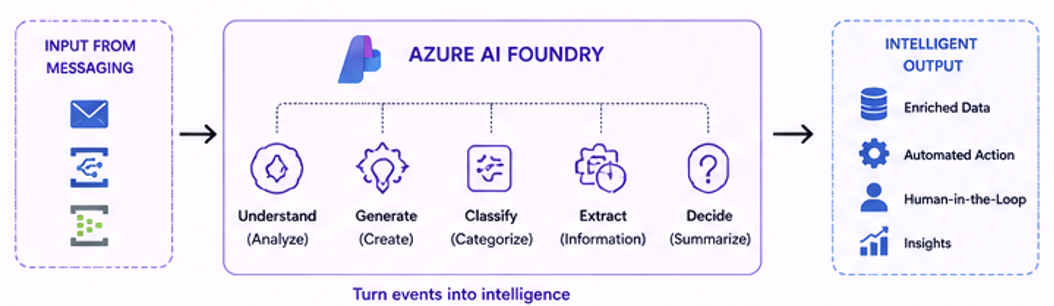
Azure AI Foundry is where the intelligence happens.
Once your event reaches a consumer, you can:
- Analyze text
- Generate responses
- Classify data
- Extract meaning
This turns a simple event into something actionable.
For example:
- A support ticket is created → AI categorizes it
- A document is uploaded → AI extracts data
- A message is received → AI generates a reply
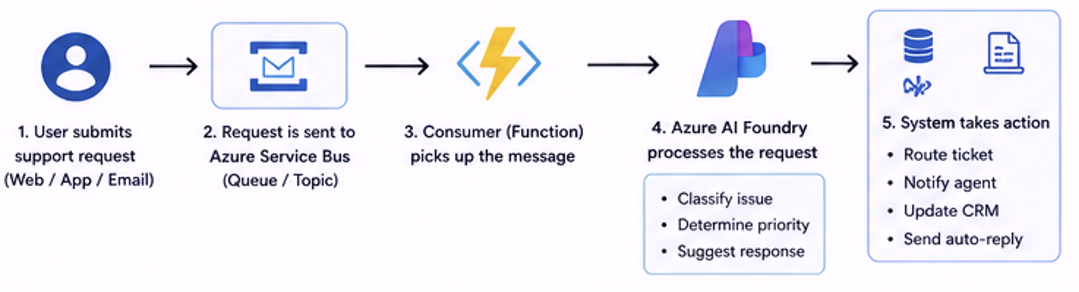
Example Scenario
Let’s say you’re building a support system.
Here’s how it could work:
- A user submits a support request
- The request is sent to Azure Service Bus
- A consumer picks it up
- The message is sent to Azure AI Foundry
- AI:
- Classifies the issue
- Determines priority
- Suggests a response
- The system routes the ticket automatically
No manual triage needed.
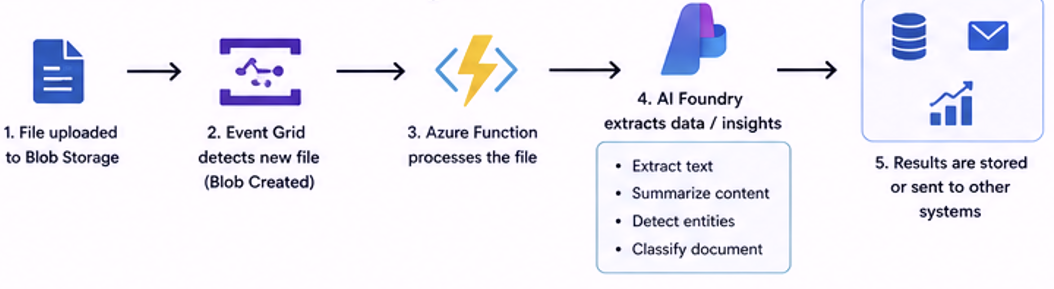
Another Scenario: File Processing
- A file is uploaded to Blob Storage
- Event Grid triggers an event
- Azure Function processes the file
- AI extracts data or insights
- Results are stored or sent to another system
This is powerful for:
- Document processing
- Data pipelines
- Automation workflows
Common Patterns
Here are a few patterns you’ll see often:
Event → AI → Action
- Event triggers AI
- AI decides what to do
- System executes
Stream → AI → Analytics
- Event Hub ingests data
- AI processes it
- Dashboard displays insights
Queue → AI → Workflow
- Service Bus queues messages
- AI enriches data
- Workflow continues
Challenges to Watch Out For
1. Latency
AI processing adds time.
Not everything should go through AI in real-time.
2. Cost
AI + Messaging = more moving parts.
Be mindful of:
- Message volume
- AI calls
- Processing frequency
3. Overengineering
Not every system needs AI.
Sometimes a simple rule-based system is enough.
Key Takeaways
- Messaging handles communication
- AI handles intelligence
- Together, they create powerful systems
- Start simple, then add intelligence where needed
Final Thoughts
The real value is not just in using Azure Messaging or Azure AI Foundry individually.
It’s in how you combine them.
That’s where systems stop being reactive and start becoming intelligent.
And that’s where things get really interesting.