
What Actually Happens When You Put WordPress and an App Behind Azure Front Door
I recently worked on a setup where I had to serve both a marketing site and an authenticated application under the same domain. Sounds simple at first, but once you start implementing it using Azure Front Door, you’ll quickly realize there are a lot of moving parts.
In this blog, I’ll walk through what actually happens in this kind of setup, the decisions you need to make, and some of the real issues I encountered along the way.
The Goal
The goal was straightforward.
I had:
- A WordPress site for marketing
- An ASP.NET application for logged-in users
And I wanted both to live under a single domain like example.com.
The expected behavior was:
- If the user is not logged in → show the marketing site
- If the user is logged in → route them to the application
- Some paths like
/apior/loginshould always go to the app - Marketing pages should still be accessible when needed
The Architecture
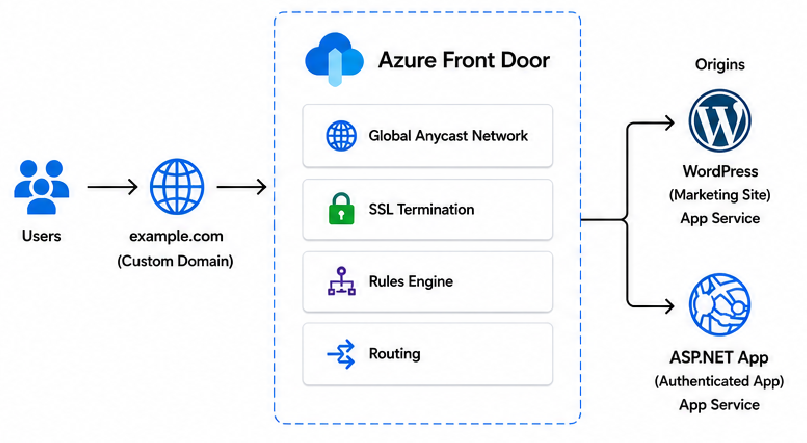
At a high level, Azure Front Door sits in front of everything.
Behind it, there are two origins:
- WordPress (marketing site)
- App Service (ASP.NET application)
Azure Front Door is responsible for routing requests based on:
- Path
- Headers (for authentication scenarios)
- Rules
Instead of exposing multiple domains, everything goes through Front Door and gets routed internally.
Routing Strategy
This is where things start to get interesting.
1. Path-Based Routing
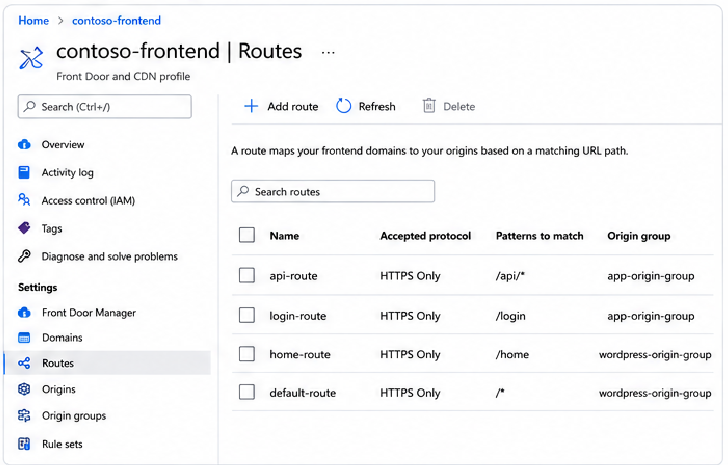
The first thing I did was define clear paths.
For example:
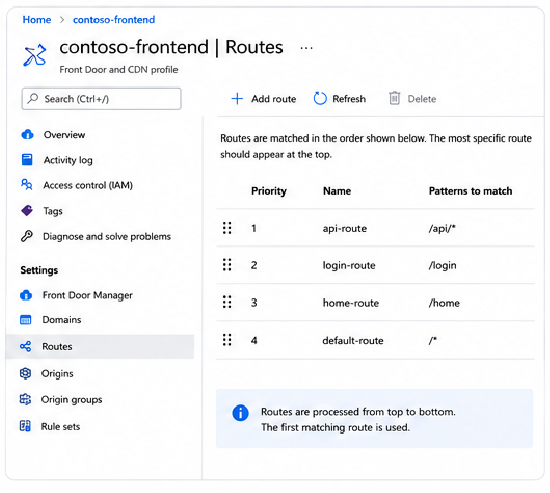
/api/*→ App Service/login→ App Service/→ WordPress (default)
This works well for most cases and is the foundation of the routing.
2. Handling Authenticated Users
The tricky part is this.
How do you route users differently based on whether they are logged in or not?
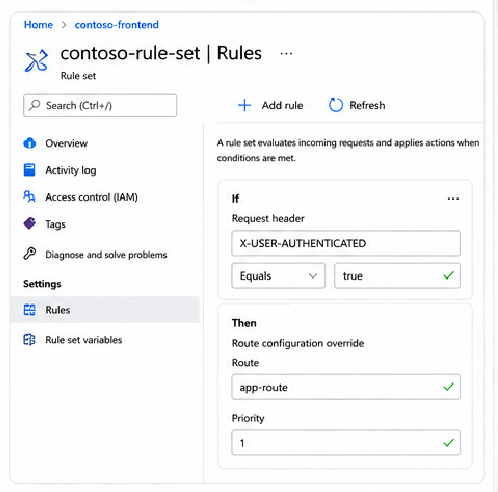
I handled this using headers.
When a user is authenticated, I add a header like X-USER-AUTHENTICATED: true.
Then in Azure Front Door rule sets, I check for this header.
If it exists:
- Route
/to the application instead of WordPress
If it does not:
- Keep
/pointing to WordPress
This allows the same URL to behave differently depending on the user state.
3. Marketing Access for Logged-In Users
One edge case I had to solve was this:
What if a logged-in user still wants to access the marketing site?
I introduced a separate route like /home.
This always points to WordPress, regardless of authentication.
So:
/→ dynamic (depends on auth)/home→ always marketing
Simple but effective.
Real Issues I Hit
This is the part most blogs skip, but this is where the real learning is.
1. CORS Problems
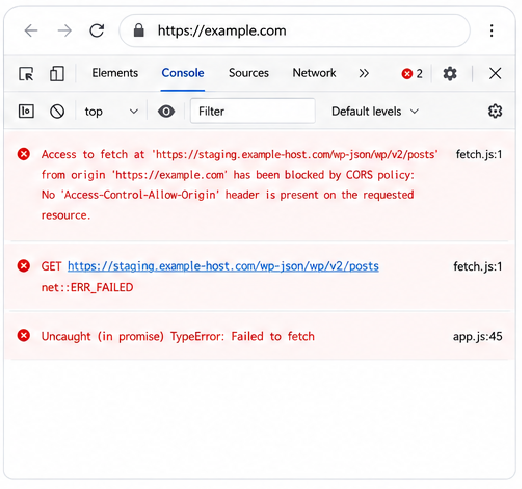
At one point, WordPress was still referencing its original staging domain like staging.example-host.com.
When accessed via the Front Door domain example.com, I started getting CORS errors because the origins didn’t match.
Fix:
- Make sure all assets and API calls use the Front Door domain
- Avoid hardcoded staging URLs in WordPress
2. Staging URLs Leaking
Another issue was SEO-related.
WordPress was configured with a staging URL as its base URL.
This caused:
- Metadata pointing to the wrong domain
- Potential SEO issues
Fix:
- Update WordPress Site Address and Home Address
- Double check SEO plugins and configs
3. 404 Behavior Differences
This one was unexpected.
If you hit a non-existent page:
- WordPress origin returns a proper styled 404
- Azure Front Door sometimes returns a plain 404
This happens because Front Door may not always forward the request to the origin.
Fix:
- Ensure fallback routing is configured
- Or explicitly handle unknown paths
4. Route Priority Confusion
Azure Front Door matches routes based on specificity.
So:
/api/*must come before/*
If not, API calls might accidentally go to WordPress.
Fix:
- Always define specific routes first
- Keep
/*as the fallback
Key Takeaways
After going through this setup, here are the main things to keep in mind:
- Define routing rules clearly from the start
- Use headers for dynamic routing scenarios
- Avoid staging URLs leaking into production
- Test edge cases like 404s and static assets
- Route priority matters more than you think
Final Thoughts
Putting WordPress and an application behind Azure Front Door is definitely doable, but it’s not just a simple routing setup.
You’re essentially building a smart entry point that decides how traffic flows based on paths and user context.
Once you get it right, it gives you a clean and unified experience under a single domain, which is exactly what most modern applications need.